
Commands
Player Preferences
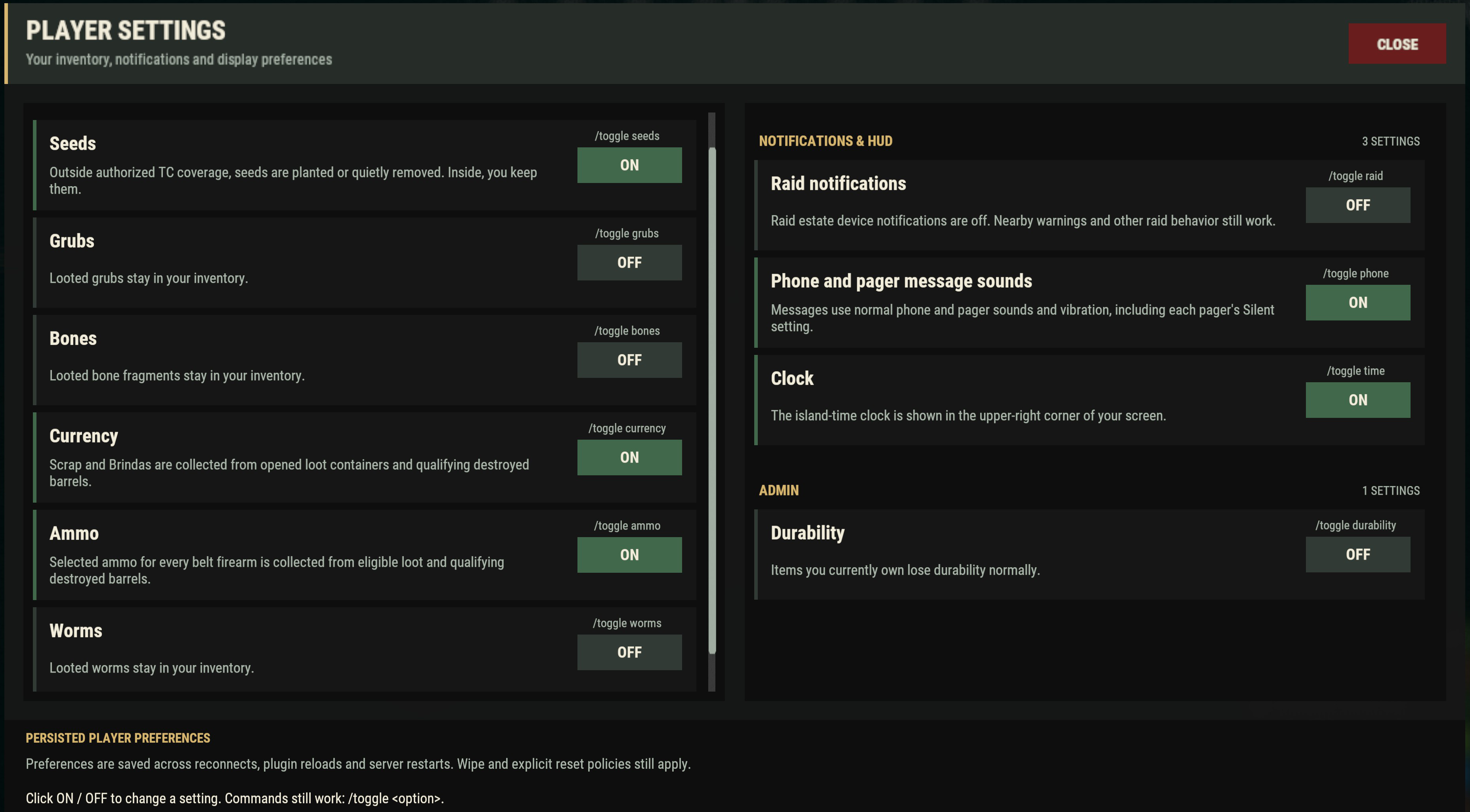
Open /toggle with no option to use its preference controls. Direct choices such as /toggle time are handy once you know the setting. /fx shows current effects; /skills, /learned and /achievements cover progress. Commands that need an item, station or particular state keep those requirements.
Help
/info
Also: /help
Syntax: /info or /help
Open the general island information panel.
/commands
Syntax: /commands
Open the commands tab of the information panel.
/rules
Syntax: /rules
Open the current player-rules tab.
Player
/toggle
Syntax: /toggle [option]
Open the personal settings UI when used alone, or change a named pickup, drop, notification, or clock setting.
-
/toggle seeds— Auto-plant or quietly remove looted seeds outside authorized Tool Cupboard coverage. -
/toggle grubs— Auto-drop looted grubs. -
/toggle bones— Auto-drop looted bone fragments. -
/toggle currency— Auto-loot scrap and Brindas from opened loot containers and destroyed barrels. Your and current teammates' containers are excluded. -
/toggle ammo— Auto-loot the selected ammo for every firearm on your belt. -
/toggle worms— Auto-drop looted worms. -
/toggle raid— Receive raid estate notifications on your phone and pager. -
/toggle phone— Play phone and pager message sounds (alias: pager). -
/toggle time— Show the island time in the upper-right corner.
/achievements
Also: /a
Syntax: /achievements [category|close]
Open the achievement summary or a named achievement category.
/skills
Also: /s
Syntax: /skills [category] | /skills skill <skill> | /skills search <text>
Inspect automatic skill categories, a skill's details, or search the catalog.
/fx
Also: /effects
Syntax: /fx
List current temporary player effects and remaining durations.
/learned
Syntax: /learned [search text]
List learned binary abilities, optionally filtered by text.
/codex
Syntax: /codex
Open the Chemistry Lab codex while within 5 metres of a deployed lab.
Nearby requirement: Stay within 5 metres of a deployed Chemistry Lab; leaving it blocks panel actions.
/r
Syntax: /r
Open your portable recycler. Only useful when you have a Personal Recycler in your inventory.
Prerequisite: Carry a Personal Recycler.
/craft
Also: /c, /workbench
Syntax: /craft
Open the custom workbench and its known recipes.
/addejector
Syntax: /addejector
Toggle your owned small wooden box between ordinary storage and an industrial loot ejector.
Prerequisite: Look at a small wooden box that you own.
World, Life & Death
/time
Syntax: /time
Report the island's current world time.
/pvp
Syntax: /pvp
Report whether you are inside a marked PvP island, near its boundary, or still in the combat period after leaving, and show the island's PvP policy.
/feud
Syntax: /feud <player> | /feud status [player]
Propose or accept a feud, or inspect feud status.
/share
Syntax: /share [public|on|private|off|status]
Toggle, set, or inspect public interaction sharing for the owned deployable or building piece you are looking at. Locks and other access rules still apply.
Nearby requirement: Look at an owned deployable or building piece within interaction range.
/vkeylock
Also: /vehiclekeylock
Syntax: /vkeylock
Place a key lock on the vehicle you are looking at. Uses a carried lock, or crafts one from its ordinary materials.
Nearby requirement: Look at a supported vehicle within 3 metres.
Prerequisite: Everyone must dismount. You need building permission and a lock or its crafting materials; the vehicle must be yours, a teammate's, or an eligible unowned vehicle.
/vlock
Also: /vcodelock, /vehiclecodelock
Syntax: /vlock
Place a code lock on the vehicle you are looking at, then set its code through the ordinary lock controls. Uses a carried lock, or crafts one from its ordinary materials.
Nearby requirement: Look at a supported vehicle within 3 metres.
Prerequisite: Everyone must dismount. You need building permission and a lock or its crafting materials; the vehicle must be yours, a teammate's, or an eligible unowned vehicle.
/giveup
Syntax: /giveup
While you are an active ghost, abandon all active graves, scatter their unresolved contents under the current death rules, and enter the fresh-life death path.
/hab
Syntax: /hab
Report the nearest balloon station's current service status.
/sil
Also: /sili, /silt, /silrestore
Syntax: /sil <url> | /sili <url> | /silt <text> | /silrestore
Paint, fit, write, or restore a targeted sign under Sign Artist permissions.
/direwolf
Syntax: /direwolf dismiss
Ask your bonded Dire Wolf visitor to leave. The bond remains, but the current visit ends and a later visit must wait for its normal cooldown.
Prerequisite: A living bonded Dire Wolf is currently visiting you.